Showing posts with label password. Show all posts

How to access a PC without password


If you’ve forgotten your Windows password and can’t log in, here are a few ways you might be able to reset your password without having to use the nuclear option and reinstall Windows.


It’s easily done: you forget your Windows password and didn’t create a password hint. Here are a few things you can do to try to log in without the password.
Obviously we provide these tips on the basis you’re going to use them on your own computer, and not for accessing someone else’s. Clearly, we do not condone that.
First, just in case it saves time, check you haven’t accidentally pressed Caps Lock. You may be typing the right password, but since they’re case-sensitive, it won’t  be recognised.

Use the hidden administrator account

We’ll mainly deal with Windows 7 here because in Windows 10 you’re likely to be using a Microsoft account, rather than a local Windows login. Click here to go to the Windows 10 password reset section, which also covers Windows 8.
Windows 7 (and some previous versions) have an administrator account which isn’t visible in normal use.
Note: this method may not work if the account has been disabled, which it is by default in some Windows 7 installations.
  1. Start up (or re-start) your computer and press F8 repeatedly
  2. From the menu that appears, choose Safe Mode
  3. Key in "Administrator" in Username (note the capital A), and leave the password blank.
  4. You should be logged in to safe mode.
  5. Go to Control Panel, then User Accounts
  6. Select the account you want to reset the password
  7. Change the password
Once that's done, here's how to get Windows to automatically sign in and not ask for a password.

Use the Windows boot disc or USB drive

If you can find a Windows DVD or bootable USB drive with Windows on it, you might be able to use the command prompt to enable a disabled administrator account.
Alternatively you can also try to force Windows to launch startup recovery by turning on your computer and when you see the Windows loading screen, hold down the power button for four second to turn it off.
Next time you start it up, Windows should offer a boot menu with an option: Launch Startup Repair.
Choose this and let Windows search for problems.
How to access a laptop without a password
Once it finishes, look for a drop-down menu called View problem details. Scroll down and click the last link.
This opens a text file. We’re not interested in this, as we’re using it to access File Explorer.
At the top of the window, click File > Open. Navigate to your Windows drive (the drive letters may have been changed) and then find the Windows\System32 folder.
Scroll down and find the file sethc. You might need to change the ‘Files of type’ to all files rather than just text files.
How to access a laptop without a password
Right-click on sethc and choose Rename. Change the name by adding a number or letter. It doesn’t matter which.
Click off the filename to save your changes.
Now scroll down to cmd (the command prompt) and right-click on it. Choose Copy, then right-click on some white space and choose Paste.  
This will create a copy, but rename it sethc just as you did with the actual sethc file before.
Close all the Windows, then click on Finish. Your computer will turn off.
How to access a laptop without the password
Boot it up again, and wait for the login prompt to appear.
Press the Shift key five times. This will launch the command prompt.
How to access a laptop without the password
Type:
net user
This will list all the user accounts. Let’s say your user account is called Jim
Now type:
net user Jim *
Now you can enter a new password for that account. If you don’t want one, just press Enter to create a blank password. You’ll be asked to type the password again to verify it.
Close the Command Prompt window and you can now log into the user account with the new password.

Use a password reset utility

If all of this fails you can download a utility which claims to break or bypass the Windows password. Again, we can’t condone the use of these for anything other than rescuing your own files in your own computer.
You’ll find these easily if you search online for ‘Windows password reset tool’, and one worth trying is simply called NTpasswd.

Windows 10 password reset

In Windows 10, you’re probably using a Microsoft account. If you forget the password, go to the password reset page and follow the instructions.


If you find any Problem Contact me on :

Facebook :
                     www.facebook.com/Rehman000786
Twitter :
                  twitter.com/onlinetechlearn
Gmail :
                technicalschool786@gmail.com
Fb Page :
                https://www.facebook.com/hackingpoint0/
Number :
                  +923031036758

How to Hack Facebook, Part 2 (Facebook Password Extractor)


Welcome back, my novice hackers!
As we saw in my first tutorial on Facebook hacking, it is not a simple task. However, with the right skills and tools, as well as persistence and ingenuity, nothing is beyond our capabilities.
One of the cardinal rules of hacking is: "If I can get physical access to the computer... GAME OVER!" This means that if I were given even just a few moments to the machine itself, I can hack anything I want from that computer—including Facebook passwords.
I recognize that not all of you are technically savvy, though, that doesn't mean you can't be with some hard work. So this Facebook hack is for those of you without either the technical savvy or the work ethic to become so. All you need is a moment or two of unfettered physical access to the target's computer and you can easily have their Facebook password.

Remember Me?

This hack relies upon the fact that most of us want websites to remember us when we return. We don't want to put in our username and password every time we want to access the site, so we tell the browser to "Remember me." In that way, we don't need to re-authenticate and provide our password, our system simply remembers it and provides it to the website.
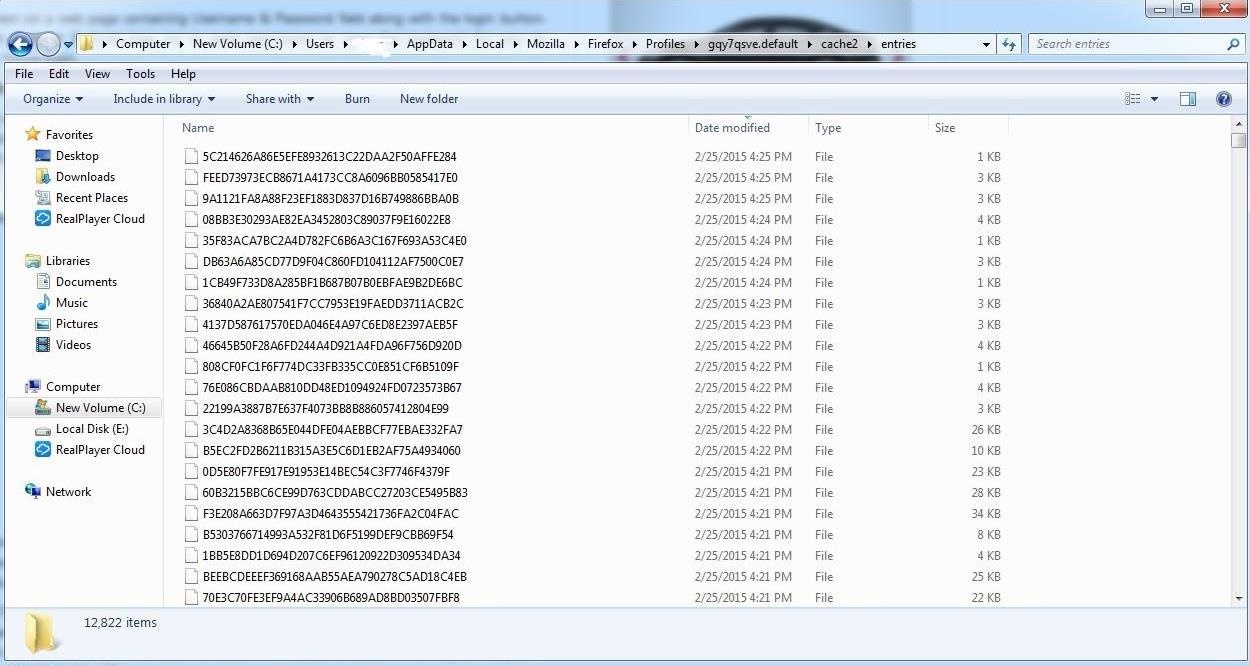
Of course, those passwords must be stored somewhere on our computer. The key is to know where those passwords are stored and how to crack the hashed passwords when we find them. For instance, Mozilla stores the users passwords at:
c:/Users/Username/AppData/Local/Mozilla/Firefox/Profiles/**.default/cache2/entries
As you can see in the screenshot below, I have displayed that directory and password hashes from a Windows 7 computer running Firefox 36. These are all the saved passwords from various websites that Firefox has stored.
Note that the location of these passwords is in different places for each browser and sometimes in different places on different operating systems with the same browser. Look for more on this subject in my Digital Forensics series in the near future.

Elcomsoft's Facebook Password Extraction Tool

Fortunately for us, there is a company in Russia named Elcomsoft.
This company employs first-rate cryptographers and they develop and sell software to crack various password encryption schemes. (As a side note, a cryptographer from Elcomsoft was the first person arrested and prosecuted under the DCMA when he came to the U.S. for a conference. He was eventually acquitted.)
Their software is listed as digital forensic tools, but they can just as easily be used for hacking purposes. One of their tools was used for the iCloud hack that revealed nude photos of Jennifer Lawrence and other Hollywood stars in August 2014.
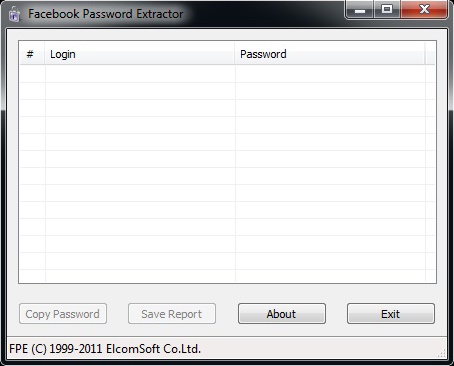
Elcomsoft developed a Windows tool named Facebook Password Extractor (FPE, for short) that extracts the user's Facebook password from its location on the user's system (the user must have used the "Remember me" feature) and then cracks it. Of course, we need physical access to the system to do this in most cases. Alternatively, if we can hack their system, we could upload this tool to the target system and then use it or we could simply download the user's browser password file and use this tool locally on our system.
You can download this free tool from Elcomsoft's website, which officially supports the following web browsers (though it may work on newer versions).
  • Microsoft Internet Explorer (up to IE9)
  • Mozilla Firefox (up to Firefox 4)
  • Apple Safari (up to Safari 5)
  • Opera (up to Opera 11)
  • Google Chrome (up to Chrome 11)
The process of using this tool is almost idiot-proof. (Almost a requirement for Facebook hacking, wouldn't you agree?) You simply install it on the system whose Facebook password you want to extract and it does everything else.
One of the drawbacks to using this tool is that Elcomsoft released it back in 2011 and it has not been updated since. Maybe we should make this a Python project for the Null Byte community in the near future?
Look for more on Facebook hacking and developing the skills and arts of a professional hacker here in the near future, my novice hackers!
Introduction to Brute 

Force Attacks

What’s a Brute Force Attack?
Fundamentally, a brute force attack is exactly what it sounds like: a means of breaking in to the back end of a website with relentless successive attempts. With a brute force attack on WordPress websites, a hacker attempting to compromise your website will attempt to break in to your site’s admin area by trial and error, using thousands of possible username/password combinations. This is usually accomplished with automated software specifically designed to generate and then try countless combinations one after the other, over and over, with the aim of finding a needle-in-a-haystack combination that will let them into your WordPress admin area. From there, they can wreak havoc on your site to their hearts’ desire.
How Do Hackers Use Brute Force Attacks Against Websites?
Brute force attacks are difficult, if not impossible, to carry out manually. Instead, hackers write simple scripts, called bots, that  carry out thousands of these break-in attempts against websites on auto-pilot. Typically, these bots are custom-written by the attackers and designed to be easily distributed across many hacked machines. These groups of bots, or botnets, work in conjunction with other commonly accessible tools that either generate thousands of passwords or use a wordlist. The latter is often referred to as a dictionary attack, because of their reliance on “dictionaries” or long lists of words to try as a list of passwords and/or usernames on your website. These lists can be reused by many hackers over and over.
Writing this type of code is very simple entry-level programming, so it’s quite accessible to virtually anyone who may want to try their hand at malicious code-writing. The tasks the bot must carry out are very basic from a programming perspective: they must set up some parameters (e.g., access your site’s login form), perform a request (try a username/password combination) and check the response (whether it worked to sign in to your WordPress admin) – and then set up to repeat until it’s successful.
Brute force attacks on your site can continue indefinitely, until the bot either discovers a username/password combination that will let the attacker into the back end of your website, or the bot runs out of passwords to check.

What Do Hackers Get Out of It?
Once attackers have gained access to your website, they can use its files and the web host server to cause a wide variety of damage through malicious behavior, including:
  • Defacement: your site can display unwanted and sometimes malicious content, your own content may be deleted, and your website can be taken down altogether;
  • Malware distribution: your site’s pages may infect your visitors with malware, ransomware and viruses;
  • Spamvertising: Your website may display spam content and/or links to spam websites;
  • Redirection: Accessing your domain name may cause your visitors to be redirected to malicious websites, or to pages that contain affiliate links and make money for the hackers;
  • Stealing system resources: by using your web server’s resources, attackers are carrying out tasks such as email campaigns and content delivery on your dime;
  • Fun: It may be hard for some people to imagine, but some attackers, particularly younger ones, are simply bored and find the act of hacking into strangers’ websites entertaining, particularly in the case of brute force attacks, which are relatively simple to learn and carry out.
How Do I Best Protect My Site?
The first and best line of defense against brute force attacks is to have a very strong username and password combination. Don’t use “admin” or an easily guessable admin username such as the URL of your website or “webmaster.”
Delete any admin level accounts you don’t need. These remove accounts that could be compromised.
Because many brute force attacks work with a preset list of dictionary words as a password list, the crucial and primary goal is to have a password that isn’t easily guessable. Use a password generator to create long, strong and random passwords for your WordPress admin accounts, and then rotate those passwords regularly – for example, every 60-90 days.
Enabling two-factor authentication on all your admin accounts is an excellent way to prevent brute force attacks because even if an attacker guesses your password, they don’t possess your mobile device, so they can’t sign in.  It is worth noting though that if you have XMLRPC enabled, attackers can use it to bypass your 2 factor authentication because the WordPress platform does not provide a way to support 2 factor via XMLRPC at present.
Wordfence protects your site against brute force attacks by:
  • Strictly limiting the number of login attempts an attacker can make via the standard login page and XMLRPC and any other authentication method.
  • Blocking well known brute force attackers by using a continually updated IP blacklist if you are using Wordfence Premium.
  • Providing 2 factor authentication for your standard login page.
  • Providing advanced manual blocking tools for site admins who are under attack.
With these measures in place, your website will be well protected against brute force attacks and it will be virtually impossible for an attacker to compromise any of your accounts through this kind of attack.
Copyright © 2013 Anonymous Hacker