Showing posts with label tools. Show all posts

Hacking Tools

In this chapter, we will discuss the information gathering tools of Kali Linux.

NMAP and ZenMAP

NMAP and ZenMAP are useful tools for the scanning phase of Ethical Hacking in Kali Linux. NMAP and ZenMAP are practically the same tool, however NMAP uses command line while ZenMAP has a GUI.
NMAP is a free utility tool for network discovery and security auditing. Many systems and network administrators also find it useful for tasks such as network inventory, managing service upgrade schedules, and monitoring host or service uptime.
NMAP uses raw IP packets in novel ways to determine which hosts are available on the network, what services (application name and version) those hosts are offering, which operating systems (and OS versions) they are running, what type of packet filters/firewalls are in use, etc.
Now, let’s go step by step and learn how to use NMAP and ZenMAP.
Step 1 − To open, go to Applications → 01-Information Gathering → nmap or zenmap.
Step 2 − The next step is to detect the OS type/version of the target host. Based on the help indicated by NMAP, the parameter of OS type/version detection is variable “-O”. For more information, use this link: https://nmap.org/book/man-os-detection.html
The command that we will use is −
nmap -O 192.168.1.101
The following screenshot shows where you need to type the above command to see the Nmap output −
Step 3 − Next, open the TCP and UDP ports. To scan all the TCP ports based on NMAP, use the following command −
nmap -p 1-65535 -T4  192.168.1.101 
Where the parameter “–p” indicates all the TCP ports that have to be scanned. In this case, we are scanning all the ports and “-T4” is the speed of scanning at which NMAP has to run.
Following are the results. In green are all the TCP open ports and in red are all the closed ports. However, NMAP does not show as the list is too long.
Step 3 − Next, open the TCP and UDP ports. To scan all the TCP ports based on NMAP, use the following command −
nmap -p 1-65535 -T4  192.168.1.101 
Where the parameter “–p” indicates all the TCP ports that have to be scanned. In this case, we are scanning all the ports and “-T4” is the speed of scanning at which NMAP has to run.
Following are the results. In green are all the TCP open ports and in red are all the closed ports. However, NMAP does not show as the list is too long.

Stealth Scan

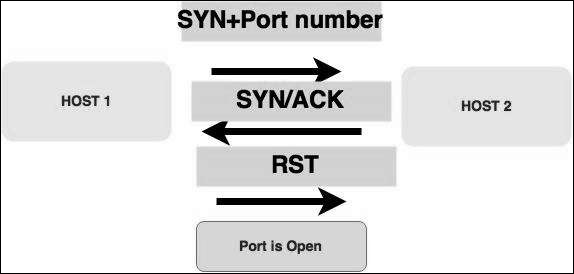
Stealth scan or SYN is also known as half-open scan, as it doesn’t complete the TCP three-way handshake. A hacker sends a SYN packet to the target; if a SYN/ACK frame is received back, then it’s assumed the target would complete the connect and the port is listening. If an RST is received back from the target, then it is assumed the port isn’t active or is closed.
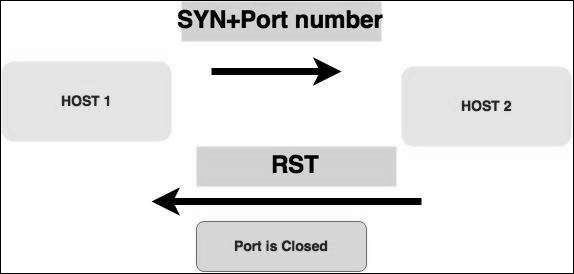
Half Open Scan
Syn Packet
Now to see the SYN scan in practice, use the parameter –sS in NMAP. Following is the full command −
nmap -sS -T4 192.168.1.101 
The following screenshot shows how to use this command −
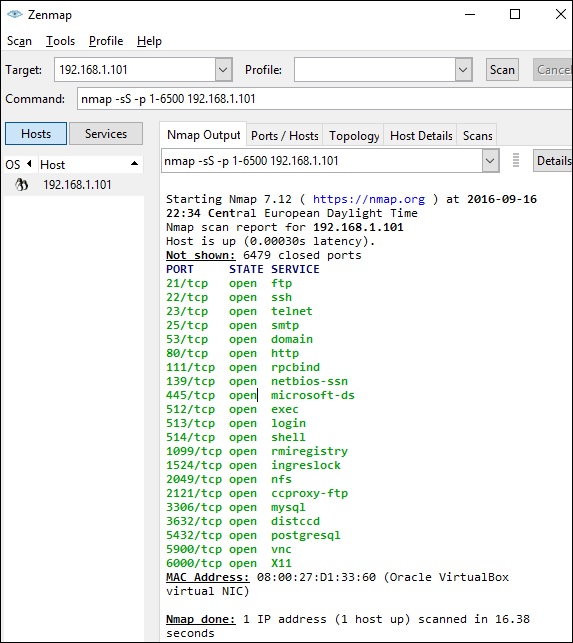
ZenMap Command

Searchsploit

Searchsploit is a tool that helps Kali Linux users to directly search with the command line from Exploit database archive.
To open it, go to Applications → 08-Exploitation Tools → searchsploit, as shown in the following screenshot.
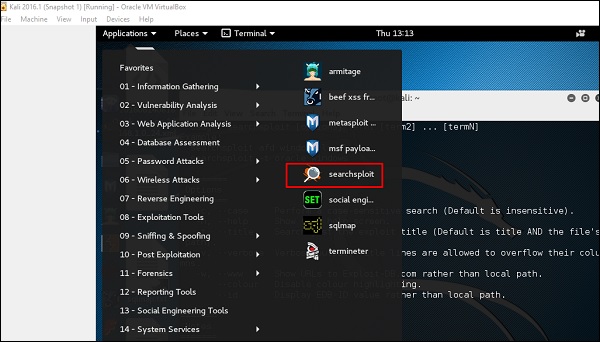
Searchsploit
After opening the terminal, type "searchsploit exploit index name".
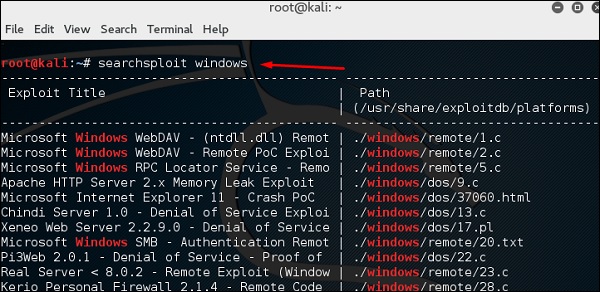
Exploit Index Name

DNS Tools

n this section, we will learn how to use some DNS tools that Kali has incorporated. Basically, these tools help in zone transfers or domain IP resolving issues.

dnsenum.pl

The first tool is dnsenum.pl which is a PERL script that helps to get MX, A, and other records connect to a domain.
Click the terminal on the left panel.
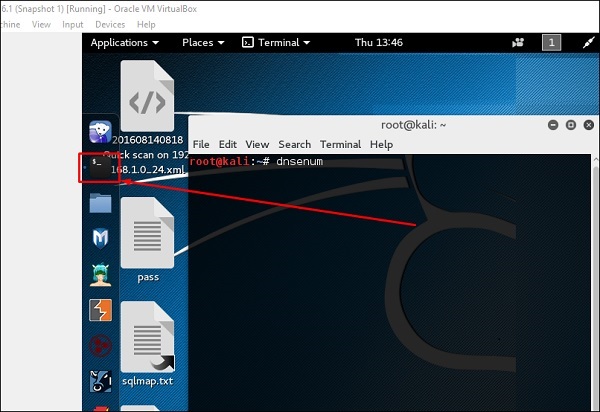
Terminal Left Panel
Type “dnsenum domain name” and all the records will be shown. In this case, it shows A records.
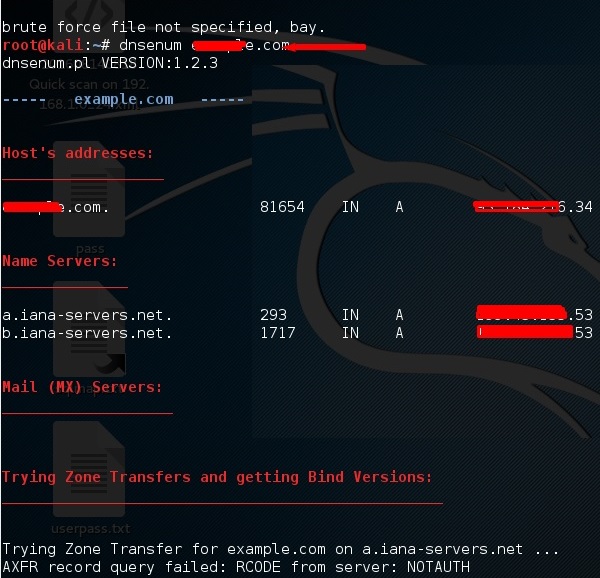
Domain Name

DNSMAP

The second tool is DNSMAP which helps to find the phone numbers, contacts, and other subdomain connected to this domain, that we are searching. Following is an example.
Click the terminal as in the upper section , then write “dnsmap domain name”
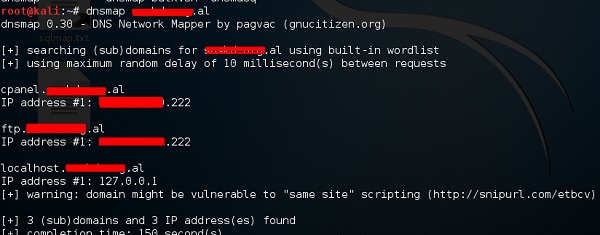
DNS Map

dnstracer

The third tool is dnstracer, which determines where a given Domain Name Server (DNS) gets its information from for a given hostname.
Click the terminal as in the upper section, then type “dnstracer domain name”.

DnsTracer

LBD Tools

LBD (Load Balancing Detector) tools are very interesting as they detect if a given domain uses DNS and/or HTTP load balancing. It is important because if you have two servers, one or the other may not be updated and you can try to exploit it. Following are the steps to use it −
First, click the terminal on the left panel.
Terminal Left Panel
Then, type “lbd domainname”. If it produces a result as “FOUND”, it means that the server has a load balance. In this case, the result is “NOT FOUND”.
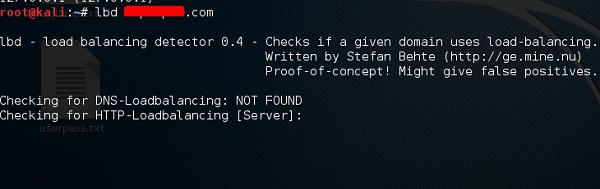
LBD Domain Name

Hping3

Hping3 is widely used by ethical hackers. It is nearly similar to ping tools but is more advanced, as it can bypass the firewall filter and use TCP, UDP, ICMP and RAW-IP protocols. It has a traceroute mode and the ability to send files between a covered channel.
Click the terminal on the left panel.
Terminal Left Panel
Type “hping3 –h” which will show how to use this command.
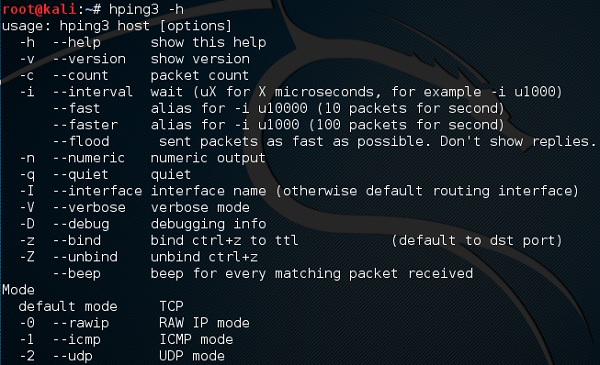
Hping3
The other command is “hping3 domain or IP -parameter”
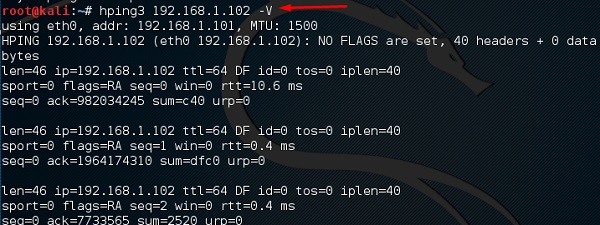
IP Parameter

Hacking Tutorials

Top Kali Linux Tools Every Hacker Should Know About and Learn


Hello friends how are you doing? I hope that everything is fine and you are enjoying your hacking ðŸ˜€ so I thought to add a little more to your hacking skills ” Top Kali Linux Tools Every Hacker Should Know About and Learn ” these tools are most favorite tools for all the hackers and the use these tools in their day to day penetration tasks.

Most of the hacking tools are pre-included in Kali Linux by Offensive Security team. There are over 300+ tools included and this site covers those tools also and we will be creating full detailed articles about most of the tools that come with Kali Linux 2.0.

Becoming an Ethical Hacker is not as easy as to become a software developer. You will quickly realize this when you will start to learn it. To do a simple hack on your own, a hacker need to have a good understanding about multiple topic. Many people say that you should have in-depth knowledge about programming languages like C++, Python, HTL etc.. and advance Linux/Unix networking knowledge to get started in this field.
But this is not enough even if you are really good at that still there will be things that you don’t know about. The software and its security is evolving with every day so as a hacker you must keep learning we things with a really fast pace.

What is new in Kali Linux 2.0?

If you are into Network Penetration and hacking stuff then Kali Linux is the best Linux Distro out with all the tools pre-installed and just ready to be used. That eases the user to use it and it is real time saver and you can own the network ðŸ˜€

Top Kali Linux Tools:-

Now let’s get started with the list of my favorite tools and a lot of other hackers favorite tools too.

1. Metasploit:-

Metasploit
Metasploit is a framework for developing exploits, shellcodes, fuzzing tool, payloads etc. And it has a very vast collection of exploits and exploitation tools bundled into this single framework. It is available for all major Operating Sytems out there Windows, OS X, and Linux and comes pre-installed in Kali Linux. It is an offensive tool and to attack your own or your company’s infrastructure to check for security loopholes and to fix them before an actual attacker can break in.
Here is a Video Demo of Using Metasploit :-
It can also be used to target web applications, networks, and servers etc. You get both GUI and command line interface. There are to products for Metasploit a Free Community version and a paid Metasploit Pro.

2. Nmap (Network Mapper):-

Nmap Project
Nmap is used to scan whole networks for open ports and for mapping networks and a lot more things. It is mainly used for scanning networks and discover the online PC’s and for security auditing. Most of the network admins use Nmap to discover online computer’s, open ports and manage services running. It uses raw IP packets in such a creative way to know what hosts are available on the network and what ports are open which services (applications name and version) are running on those systems.
It comes into version GUI and Command Line. Zenmap is the GUI version what I recommend is that first learn the command line and then move on to the GUI if you feel confident.

3. Armitage:-

armitage
Armitage is a graphical cyber attack management tool and it provides a GUI interface for all Metasploit features and makes it easier to understand and use. If you really want to understand and grow into the advanced features then Armitage is a great choice for you.
Armitage organizes Metasploit’s capabilities around the hacking process. There are features for discovery, access, post-exploitation, and maneuver.
And if you are working in a team then it can be a real help to share information with your team:
  • Use the same sessions
  • Share victim hosts, capture data, download files etc.
  • Communicate using a shared event log.
  • Run bots to automate the tasks.

4. Jhon The Ripper (JTR):-

john the ripper
Jhon The Ripper is a very popular tool for password cracking it is also known as JTR and also it has the coolest name of all the tools. Mostly it is simply referred as ‘Jhon’ it is the most commonly used tool for password cracking and to perform dictionary attacks. Jhon The Ripper takes text files, referred as a ‘wordlist’, which contains the list of commonly used passwords or real passwords cracked before, and it encrypts the password in the wordlist in the same way as the password which is being cracked. And then compare the output string with the encrypted string of the provided password.
This tool can be used to perform different types of dictionary attacks. If you are confused between Jhon The Ripper and THC Hydra then the most simple way to explain it is that THC Hydra is used to crack a password for online services and Jhon The Ripper is used for offline password cracking.

5. Wireshark:-

wireshark
Wireshark is an open source tool for network analysis and profiling network traffic and packets and this kind of tools are referred as Network Sniffers.
Wireshark, previously known as Ethereal, is used to monitor network traffic and analyze the packets that are sent out. Wireshark can intercept network traffic ranging from connection level information to bits of the information which make up a signal packet. All of this is done in real time and show to the user in a readable format. There are a lot of developments made in the tool (platform) over the years and it includes filters, color-coding the packets depending on their information and these features really help the penetration testers to dig deeper in the network traffic and inspect the packets in detail.
Note: If you are really interested in Network administration and penetration testing then knowing how to use Wireshark is a required skill. There are a lot of resources available online from where you can learn about using Wireshark in depth.

6. THC Hydra:-

THC Hydra
THC Hydra is another tool for password cracking and mostly Jhon The Ripper and Hydra are used hand to hand.  THC Hydra also known as Hydra is really popular password cracking tool for hacking Network Login it uses both Brute Force attack as well as dictionary attacks at the login page. And it supports the wide range of network protocols like SSH, Mail (POP3, IMAP, etc.), Database, SMB, VNC, LDAP, SMB, and a whole lot of other protocols.
Here is the Video showing how to use THC Hydra:-


I would also recommend that you check out this article related to Brute Force Attacks:-
Get SSH username & Password For Any Server easily with Brute Force Attack

7. Burp Suite:-

How to Setup Burp Suite
Burp Suite is a web application penetration testers Dream tool and the most powerful tool out there on the internet can it can be used to cover everything full in depth that you ever wanted. So I will be my best to thoroughly explain all the details as there are a lot of things to cover. Here is a quick list of Burp Suite components:
  • Intercepting Proxy – This part of Burp lets to inspect and modify all the requests and responses that your browser make to the target application.
  • Spider – It is a very handy tool for listing out all the directories and files on the server and its functionality.
  • Web Scanner* – The important part as it detects list of vulnerabilities present in the site.
  • Intruder – This is used to create and perform customized attacks to find and exploit unexpected errors.
  • Repeater – Modify and re-send any individual requests.
  • Sequencer – To test the randomness of the tokens (csrf , authenticity_token etc )
  • Extensions* – Allow you to write and add you own custom designed plugin or download pre-made plugins, to performs complex and fully customized attacks.
* Donates those features which are only available in pro version.
Here is a helpful article explaining Burp Suite in full depth:
Burp Suite Tutorial Web Penetration Tool Kit

8. OWASP Zed:-

zaproxy
OWASP Zed Attack Proxy (ZAP) is also a well known Proxy tool and is a pretty good alternative for Burp Suite and the good thing is that its free and open source. And if you have read all of the above-written content than that means that you already know about this stuff a little bit ðŸ˜€and you might be familiar with what is OWASP.
And if you don’t know what OWASP is then here is a short and easy to understand OWASP is the free and open source software security community.
And if you are getting into web penetration testing then you must read the OWASP Top 10 it is  ‘guide-book’ of web application security.
This tool does the job pretty good and is also easy to use program that finds vulnerabilities in web applications. What make OWASP ZAP good to use tools is because it has a lot of support from the OWASP security Community. You can use it to scan the target and run an automated scan to find vulnerabilities and you can also do manual testing like the pro style.

9. Social Engineering Toolkit:-

Social engineer toolkit
`
The Social-Engineering Toolkit or popularly known as SET is a really handy and useful tool in terms of that the attacks are targeted at the human element instead of the system. It have really useful features that let you send email to victims create backdoor Java applets etc and you can do really cool stuff with this. It is a command line interface and works on Linux, Mac OS X and Windows.

10. Aircrack-ng:-

aircrack-ng
Again a Password cracking tool here and this time it is used to crack Wifi password. These kind of tools are really effective if used in the right hands. For those new to this wireless-specific hacking program, Aircrack-ng is an 802.11 WEP and WPA-PSK keys cracking tool that can recover keys when sufficient data packets have been captured (in monitor mode). For those tasked with penetrating and auditing wireless networks Aircrack-ng will become your best friend.
And if you are getting into Wifi hacking and are a mediocre hacker then it will take you few minutes to crack WEP wireless password and to crack WPA/WPA2 you will have to do a lot of work.
For those who are interested in wireless hacking do check out Reaver another popular wifi hacking utility.

11. BeEF:-

BeEF Browser Exploitation Framework
BeEF is an abbreviation of The Browser Exploitation Framework it is mainly focused on the web browser based penetration testing tool. That mean’s that it takes advantage of the vulnerabilities that exist in the web application used by the victim. Mainly it take advantage of Cross Site Scripting and after the payload is executed the attacker can fully take over victims web browser.

12. Maltego:-

How to Use Maltego to Do Network Reconnaissance
This tool gathers all information available about the target over the internet like emails, DNS records and many other. It can be used to gather information about individuals or either network. It is in the category of digital forensics.
Here is a complete article about how you can use Maltego:

13. Ettercap:-

EtterCap
It is a free and open source network security tool for man-in-the-middle attacks on LAN. It can be used to your network protocol analysis and security auditing. It is available on Windows, Unix, Linux BSD and other distros.

14. Nikto Website Vulnerability Scanner:-

Nikto Website Vulnerability Scanner
Nikto is open source vulnerability scanner use to test for different vulnerabilities in web servers.  The system searches against a database of over 6800 potentially dangerous files/ programs it also checks for outdated (unpatched) versions of over 1300 servers checks for bad configuration practices like multiple index files, HTTP server options and it will check to find the web server that is installed.

Final Words:-

These are not the only tools that are helpful and can be used for penetration testing there are many other tools out there that can be used for the same thing and you can get better results for your penetration testing.
Copyright © 2013 Anonymous Hacker